| File type | APK |
|---|---|
| Version | 1.1.1 |
| Publisher | RichFace |
| Release date | Oct 19, 2019 |
| Date added | Oct 19, 2019 |
| Os requirements | Android |
| Requirements | Requires Android |
| Total downloads | 5 |
| Price | Free |
Description
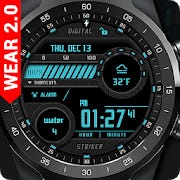
Digital Striker Watch Face for Wear OS is watch face with digital characteristics and interactive functions.
Watch face contains a huge number of settings on the watch and the phone companion app.
The Wear OS 2.0 comes with an external complication which this watch face supports completely.
Digital Striker Watch Face is fully Wear OS 2.0 supported
Wear OS 2.0 integration
Fully standalone! (iPhone and Android compatible)
External complication data for the indicators
Compatible with all WearOS smartwatches
Free version
Complications:
Weather
Built-In Steps
Options:
Change color
24 hour format
Leading zero
Screen time
Date formats
NEW option for paid version
Vibrate on every hour
Paid version
Built-in complications:
Steps
Distance
Walking
Running
Biking
Calories
Fit statistics
Water counter
Coffee counter
Hear Rate
Built-In Steps
Options:
External complications
Change color
24 hour format
Leading zero
Screen time
Forecast
Full ambient mode option
Change a color preset on tap
Date formats
Tap indicator
Google FIT integration
Weather settings (location, providers, frequency update, units)
FAQ
!! Please contact us if you have any trouble with the app !!
How do I install the watch face on Wear OS 2.0?
1. Install it from Google Play Wear Store on your watch.
2. Install the companion app for fully customization (Android phone devices).
Why I can not see steps or activity data in a built-in complication?
To see steps and other fit data, you need to connect the app with Google Fit.
There are two options:
1. Connect to Google Fit via settings located on your smartwatch
2. Connect to Google Fit via settings located on the phone companion app (only for Android phone devices)
Watch face cannot be install on smartwatches with Tizen OS or any other OS
PERMISSIONS Explained
http://www.richface.watch/privacy.php


